Mapping Azure DevOps Pipelines Into SQLite
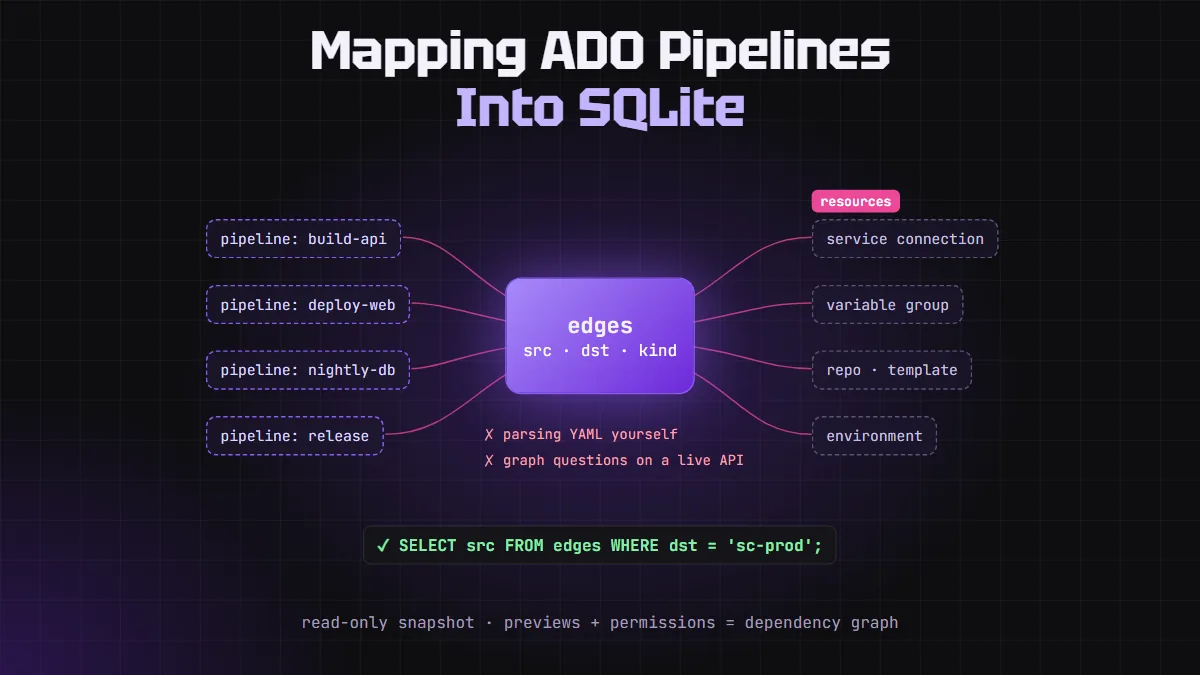
Azure DevOps (ADO) is good at running pipelines and bad at telling you how they relate to each other. Which pipelines use this service connection? If I delete this variable group, what breaks? The UI answers one question at a time, and the API wasn’t built for graph questions at all.
This is the pattern behind an internal tool I built to answer those questions anyway. Call it the pipeline map. I’ll keep the specifics general, but the design travels to any team running a non-trivial Azure DevOps estate.
Query a copy, not the live system
The core decision is simple: every screen in the tool reads from a local SQLite snapshot of the ADO estate. Nothing queries ADO live.
That removes a whole category of problems. The UI is fast because it’s hitting a file on disk, not a rate-limited REST API. It stays usable even when ADO itself is slow or throttling. And because the tool only ever reads from its own snapshot, it’s read-only by construction. The cost is staleness, which the sync schedule is built to keep small.
What gets synced, and how
A sync walks about twenty ADO REST endpoints: projects, YAML and classic and release pipelines, builds with their timelines and logs, service connections, variable groups, secure files, environments, repositories.
A few things make this reliable at scale:
- Paging follows the
x-ms-continuationtokenheader rather than assuming a fixed page size. - Backoff on 429 or 503 retries up to 5 times, honouring
Retry-Afterwhen ADO sends one, otherwise exponential backoff capped at 30 seconds. - Fan-out runs with a concurrency of 5, so one slow project doesn’t serialize the whole org.
- Isolation per project. Each project’s sync is wrapped so one failure is logged and the rest continue.
A full sync runs every 6 hours. An incremental sync runs every 15 minutes and only pulls builds newer than a per-project cursor, skipping slower-moving data. An in-process scheduler holds an overlap lock so the two never collide. Every write is INSERT ... ON CONFLICT DO UPDATE keyed on natural ADO identifiers, so any sync, partial or full, is idempotent. Simplified:
-- a pipeline is identified by its project and its ADO id
INSERT INTO pipeline (project_id, ado_id, name, folder, ...)
VALUES (?, ?, ?, ?, ...)
ON CONFLICT (project_id, ado_id) DO UPDATE SET
  name = excluded.name,
  folder = excluded.folder;
The trick that makes resource edges free
The hardest question to answer from the ADO API is also the most useful one: which pipelines are allowed to use a given service connection, variable group or secure file?
The answer already exists. The pipelinePermissions endpoint for each protected resource returns exactly that: the pipelines authorized to use it. That’s a pipeline-to-resource edge, handed to you directly, no YAML parsing required.
The one wrinkle is resources left open to every pipeline in a project. Rather than storing one edge per pipeline, the sync stores a single sentinel wildcard edge, so the table doesn’t explode on the handful of resources everyone can touch.
The trick that replaces parsing YAML
The obvious way to find trigger relationships, template usage and multi-repo checkouts is to parse azure-pipelines.yml. The problem is that real pipelines extend and template other files, sometimes several layers deep, and a parser has to resolve all of that correctly or it silently misses edges.
Instead, the sync calls the pipeline preview endpoint:
POST https://dev.azure.com/{org}/{project}/_apis/pipelines/{pipelineId}/preview
Content-Type: application/json

{ "previewRun": true }
With previewRun: true, ADO expands every template and extends reference server-side and hands back the final, flattened YAML, without queuing an actual run. That expanded YAML is what gets parsed, so the parser never has to resolve a template: reference itself.
Parsing is defensive and never throws on malformed structures. It looks for resources.pipelines (triggers), resources.repositories (multirepo), checkout aliases and variable group references (uses_resource), and template/extends (template).
One edge table, a handful of algorithms
The schema otherwise is unremarkable on purpose: org, project, pipeline, run with its tasks and logs, resource with per-type details, secret metadata. Ten numbered migrations run automatically on open.
The table doing the real work is a typed edge table: (project_id, src_type, src_id, dst_type, dst_id, relation, is_wildcard, discovered_via), unique over that six-tuple, with relation constrained to triggers, uses_resource, uses_secret, template or multirepo, and discovered_via recording whether it came from the API or from parsed YAML.
With that table in place, several useful questions turn into plain queries:
- Blast radius: breadth-first search over a “downstream” adjacency. Trigger edges walk as-is; resource edges walk inverted, so “what does changing this connection affect” starts from the resource and finds every pipeline permitted to use it.
- Trigger-cycle detection with Tarjan’s strongly connected components.
- Orphan detection for service connections, variable groups and other resources that no pipeline uses.
- A health score: 100 minus weighted penalties for failure rate, flakiness, duration regression, stuck runs and staleness.
- Co-failure clustering via Jaccard similarity over 60-minute failure buckets.
- Failure-signature clustering on the first error line of a failed run.
None of this needed a graph database. An indexed edge table and a BFS were enough.
Expiry dates, not secrets
A smaller piece of the tool looks up expiry dates for service-connection app credentials and Key Vault items, storing expiry dates only, never values. Workload identity federation connections, which have no credential to expire, simply show as having none. An expiring credential shows up as a dashboard row weeks ahead, instead of as a failed deployment on the day.
Two append-only tables add history ADO doesn’t keep on its own: a hash-guarded revision table stores expanded YAML only when it changes, and failed-run logs are archived, capped at 512 KB and 25 per project per sync, so they outlive ADO’s own retention window.
Stack and the stance on security
SvelteKit 2 with Svelte 5 and TypeScript, better-sqlite3 in WAL mode with foreign keys on and a 5-second busy timeout, zod for input validation, and the dependency graph laid out with elkjs in a web worker so the layout never blocks the page. It runs in Docker behind a reverse proxy, as a non-root user.
Because this reads across an entire ADO estate, access is treated as seriously as the data:
- An IP allow-list is the first check in the request handler, in front of everything including
/healthz, so the health endpoint isn’t a free version-disclosure surface. It matches against the client IP taken from the rightmost hop of the proxy header, since the leftmost hop can be forged. - Sign-in is Entra ID OIDC with PKCE and JWKS verification, opaque server-side sessions, httpOnly, 8-hour lifetime, with distinct admin and viewer roles.
- ReDoS guards on the YAML search, and an SSRF guard validating Key Vault names before any URL is built from them.
Auth to ADO itself is either a read-only PAT, scoped only to Read permissions, encrypted with AES-256-GCM using a random 12-byte IV and decrypted just in time, or a service principal via Entra client-credentials, which avoids having a token to rotate at all.
Honest limits
Service-connection references inside pipeline YAML aren’t turned into edges yet; those come only from the permissions API. Pipelines and resources deleted in ADO currently stay in the snapshot, so the graph can show things that no longer exist; pruning them is on the list. And SQLite is single-writer, so the whole thing runs as one container.
Takeaways
- Snapshot instead of querying live when a system is slow, rate-limited, or wasn’t built for the question you’re asking.
- Look for an API that already answers your hard question before building a parser to derive it. Permissions endpoints often already encode the relationship you want.
- Let the server expand templates for you. A preview endpoint that resolves
extendschains beats reimplementing that resolution yourself. - One typed edge table beats a graph database for most dependency questions, as long as it’s indexed and records how each edge was found.
- Store expiry dates, never secret values, when the point is a radar, not a vault.