A Contact Form on a Static Site, Done Properly
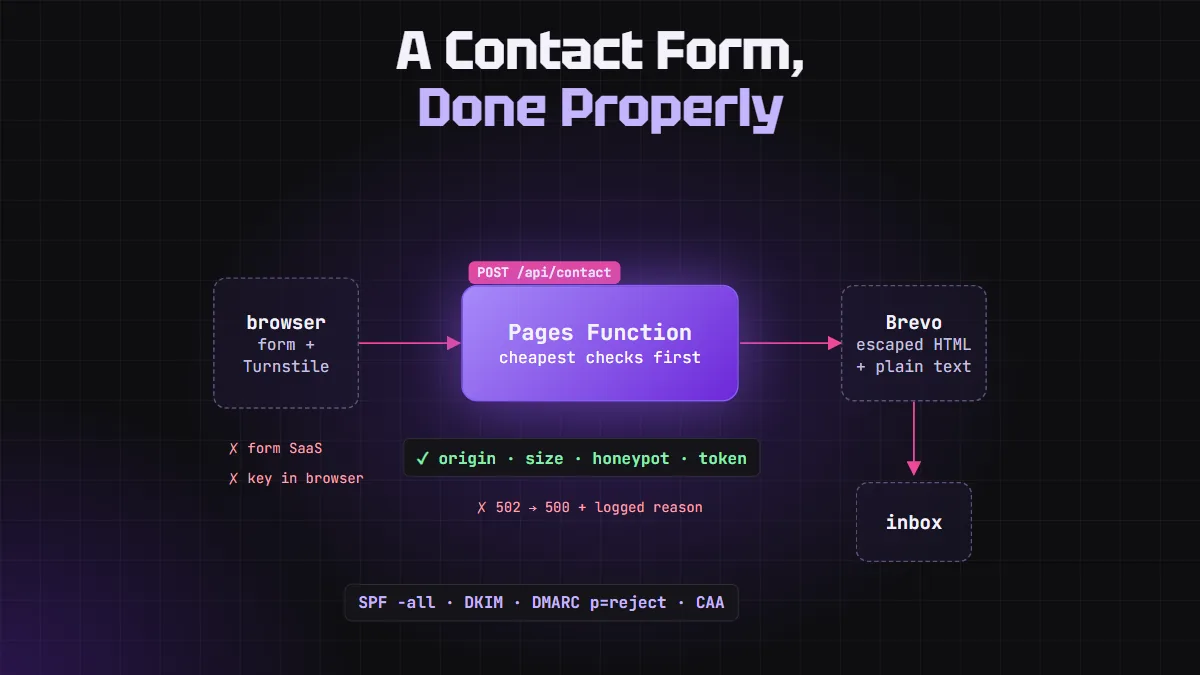
This site is static Astro, hosted on Cloudflare Pages, with a strict content security policy: scripts only load from the same origin or from a hash I’ve approved, and there are no cookies anywhere. That’s a good place to be. It’s also a hard place to add a contact form to, because a contact form wants a backend, and a backend is attack surface.
Update, October 4, 2026: the site now has Google Analytics, but it only loads if you accept it in the cookie banner. Until you do, there are still no cookies.
At first the form didn’t have one. It just opened the visitor’s mail app with a mailto: link. Zero attack surface, no third party involved, nothing to configure. The problem is that plenty of people on work PCs have no mail client set up at all, so the link opened nothing and the message never got sent.
Why not just drop in a form service
The easy fix is one of the hosted form backends: paste a key into your HTML, point your form at their endpoint, done. I didn’t want that, and the reason is the key itself. It has to live in the page source for the browser to use it, which means anyone who views source can copy it and start sending mail through your key straight to your inbox. A honeypot field stops the dumb bots that fill in every input they see, but it does nothing against someone who read the HTML and built a request by hand.
I wanted something that didn’t hand out a reusable secret to every visitor’s browser.
The design
Three pieces: Cloudflare Turnstile for the human check, a Pages Function at /api/contact as the only thing allowed to send mail, and Brevo’s transactional email API to actually deliver it.
Turnstile is set to interaction-only appearance, so it’s invisible unless it actually needs you to click something. It also only loads when the form is opened, not on every page view:
const loadTurnstile = () => {
  if (!sitekey || widget !== undefined || document.getElementById("cf-turnstile-js")) return;
  const s = document.createElement("script");
  s.id = "cf-turnstile-js";
  s.src = "https://challenges.cloudflare.com/turnstile/v0/api.js?render=explicit";
  s.async = true;
  ...
};
That matters for the CSP. Ordinary visitors browsing the site never trigger a request to challenges.cloudflare.com, so the policy only needs to allow that domain in script-src and frame-src, and only the people who open the dialog ever load it. On localhost the client swaps in Cloudflare’s always-pass test key instead of the real site key, so I can develop without tripping the real challenge.
The server, cheapest checks first
The function does its checks in order, cheapest first, so a bad request gets rejected before it costs anything:
// 1. Only the site itself may post here
if (!allowed.includes(originHost)) return json(403, { ok: false, error: "origin" });
if (!(request.headers.get("Content-Type") ?? "").startsWith("application/json")) return json(415, ...);
if (Number(request.headers.get("Content-Length") ?? 0) > MAX_BODY) return json(413, ...);
Same-origin check, content type, body size cap. Then field validation with the same limits the form itself enforces (name, a real-looking email, a 5000 character message), then the honeypot: if that hidden field has anything in it, the function answers 200 ok and sends nothing, so the bot thinks it worked and moves on.
Only after all of that does it call Cloudflare to verify the Turnstile token server-side. Tokens are single-use and tied to a hostname, so a token can’t be replayed and can’t be lifted from a different site. Only after the token checks out does it call Brevo.
Nothing from the visitor is stored anywhere, and nothing they typed is echoed back in the response. The two real secrets, the Turnstile secret and the Brevo API key, are encrypted Cloudflare Pages secrets, never in the repo. If either one is missing, the function answers 503, and the client falls back to the original mailto: link, so the form degrades to exactly what it used to be instead of failing silently.
Four bugs worth telling
Secrets don’t apply retroactively. Pages secrets only take effect on deployments created after you set them. My first test still behaved as “unconfigured” even though the secret was sitting right there in the dashboard, because the live deployment predated it. A redeploy fixed it.
Cloudflare’s edge hides your real error. The function originally returned 502 on a failed delivery, and Cloudflare’s edge quietly replaced that with its own generic error page, so I had no idea what actually went wrong. Switching the response to 500 and logging Brevo’s status code and message (never any visitor data) fixed that, and wrangler pages deployment tail let me read the function’s logs live. That’s how I found the real problem: a 401 with “key not found,” because the wrong kind of Brevo key had been stored.
Brevo invents HTML if you don’t give it any. Send only a text part and Brevo generates the HTML version itself, and in my first test it treated <email> in the signature line as an actual tag and swallowed it. The fix is to send an explicit HTML part alongside the text, with every visitor-supplied field escaped before it goes in. I tested a message containing <script> and <b> afterward, and both arrived as literal text, exactly as they should.
Gmail ignores a Reply-To pointed at itself. I kept testing by submitting the form with my own address, and Reply-To never seemed to do anything. Gmail just silently ignores a Reply-To that matches the address it’s already showing you. Testing with a +alias address instead showed it working the whole time.
Locking down the sending domain
Getting the form working was only half of it. Brevo authenticates the sending domain through DKIM, via two CNAME records. Once a test message arrived, I checked its headers and saw DKIM pass, SPF pass, DMARC pass, all green.
Only after seeing that passing result did I tighten things further: DMARC went to p=reject with sp=reject and strict DKIM alignment, and I added an SPF record of v=spf1 include:spf.brevo.com -all. Together those say that nothing but Brevo is allowed to send mail as this domain, and anything that fails the check gets rejected outright rather than just flagged. A final test after making that change confirmed delivery still worked under the stricter policy.
One thing I couldn’t fully get rid of: Brevo can’t fully disable open tracking on transactional email on this plan, only anonymize it. I’m fine with that tradeoff, because those emails only ever land in my own inbox. No visitor’s open is ever tracked, because no visitor ever receives one of these emails.
Takeaways
- A reusable key in page HTML is a liability, not a convenience. Anything a visitor’s browser needs to send a request, another visitor’s browser can copy.
- Check the cheap things first. Origin, content type, size, then validation, then the expensive calls to third parties.
- A single-use, hostname-bound token beats a static secret for anything a browser has to hold.
- Don’t let the edge eat your real error. If responses get rewritten upstream, change the status code and log the detail yourself.
- Test email delivery with an alias of your own address, not your bare address, or Gmail’s own behavior will look like your bug.
- Verify before you tighten. DMARC and SPF went strict only after I’d confirmed the passing result, not before.